
Key Takeaways
- Learning how to create an online ordering website starts with the right domain and website structure. Use a branded URL, keep it easy to find, and make the Order Online button visible across the website.
- Your restaurant’s existing content is enough to start building. Your logo, colors, food photos, menus, marketplace listings, and social channels can guide the website without a separate branding or website development project.
- Build every page around what customers need to do next. A user-friendly homepage should quickly explain what you serve, where you’re located, and whether customers can order pickup, catering, reservations, or food delivery.
- An orderable menu needs more than a list of dishes. Your online ordering system should include prices, modifiers, add-ons, required choices, availability rules, and clear options for customers to add items and complete their purchase.
- Match the ordering system to your restaurant’s real operations. Configure pickup, delivery, curbside, catering, and mobile ordering around your kitchen hours, prep times, service areas, and the needs of multiple locations.
- Checkout should support the payment options and systems you already use. Connect online payments, taxes, tips, fees, order notifications, POS tools, and multiple payment options so customers order smoothly and your team can process orders without unnecessary manual work.
- Restolabs handles much of the heavy lifting. The online ordering platform can build your menu, configure delivery and checkout rules, connect existing systems, test the full customer experience, and launch a branded ordering website in as little as three days.
Did you know nearly 75% of restaurant traffic now occurs off-premises, according to the National Restaurant Association’s Off-Premises Restaurant Trends report?
For restaurant owners like you, that makes the ordering channel a major margin decision. Marketplaces like DoorDash and Uber Eats help new customers find you.
But when someone knows your food and intends to order from you, continuing to route that order through a marketplace means paying commission on demand your restaurant has already earned.
A direct online ordering website gives those customers a direct way to return. It helps minimize ongoing commissions, strengthen your relationship with regulars, and support repeat ordering through a channel you own.
But the challenge is most owners assume creating one is a massive technical project: setting up menu rules, payment gateways, delivery zones, and checkout flows.
In practice, you can work through the setup step by step without being a website developer. This guide shows you how to create an online ordering website, what information to prepare, and where Restolabs can step in when the setup becomes technical.
How to Create an Online Ordering Website With Restolabs
Here’s a logical sequence to this process:
1. Choose your domain and plan the online ordering site
Start with your web address — the thing customers type in to find you.
If you already own a domain such as “abccoffee.com,” you can continue using it. If you’re registering a new one, choose a domain that’s as close to your restaurant name as possible and easy for customers to recognize and type.
Next, decide how the ordering experience will connect to it. If your restaurant website is at “abccoffee.com,” your ordering page may then use:
- order.abccoffee.com
- abccoffee.com/ordering
Your ordering page is the transactional part of the website where customers browse the orderable menu and complete checkout.
The remaining website pages help potential customers discover your restaurant, understand what you offer, find the correct location, and reach that ordering experience. This step and the two that follow assume you want the full website.
A branded ordering URL keeps the customer on a website connected to your restaurant rather than sending them to a third-party marketplace domain.
It also makes the page easier for customers to recognize, share, and return to, and supports your restaurant’s search engine optimization (SEO) by giving Google a dedicated page to crawl, index, and connect with your menu, location, brand name, and direct ordering experience.
Once the web address is clear, the next step in how to create an online ordering website is mapping out the main pages it needs. For most restaurants, that may include:

Keep the structure based on what customers actually need to do – for instance:
- A single-location takeout restaurant may only need a homepage, menu, ordering flow, and contact information.
- A multi-location brand may need a “Locations” page that directs customers to the right restaurant and ordering menu.
- A full-service restaurant may need reservations alongside direct ordering.
Your “Order Online” button should remain visible in the main navigation so customers can order from any page. In addition, implementation of clear calls-to-action improves user guidance.
🌐 Learn: Key Benefits of Online Ordering for Restaurants
2. Gather your restaurant content and carry your brand across the website
A key part of how to create an online ordering website is making it feel like an extension of your restaurant — your colors, your photos, and your tone carried across. But personalizing it doesn't mean building a separate mood board or brand guide.
You already have the references you need: your existing website, marketplace listings, social profiles, menus, and food photos. They show the look and voice your restaurant has already established.
Use them to gather your restaurant name, logo, main brand colors, food images, and a short introduction on your ordering website. Keep the contact details consistent with the information shown on your Google Business Profile and other active restaurant listings.
Keep the written content straightforward. Your restaurant introduction should tell customers:
- What type of food you serve
- Where you’re located
- What makes the restaurant distinct
- Whether they can order for pickup, delivery, catering, or dine-in
For example:
ABC Coffee is a neighborhood café serving espresso drinks, breakfast sandwiches, and fresh pastries in downtown Austin. Order ahead for pickup or schedule catering for your next office meeting.
That gives customers more useful information than a broad statement such as “Great food made with love.”
🧐 Learn: How to Rank Higher on Google and Get More Orders
3. Build the homepage around the customer experience
Your homepage doesn’t need to explain everything about your restaurant. It should quickly help customers understand what you serve, where you’re located, which order types are available, and where to click next.
Put the introduction you wrote in step 2 at the top, alongside a strong food or restaurant image and a visible “Order Online” button.
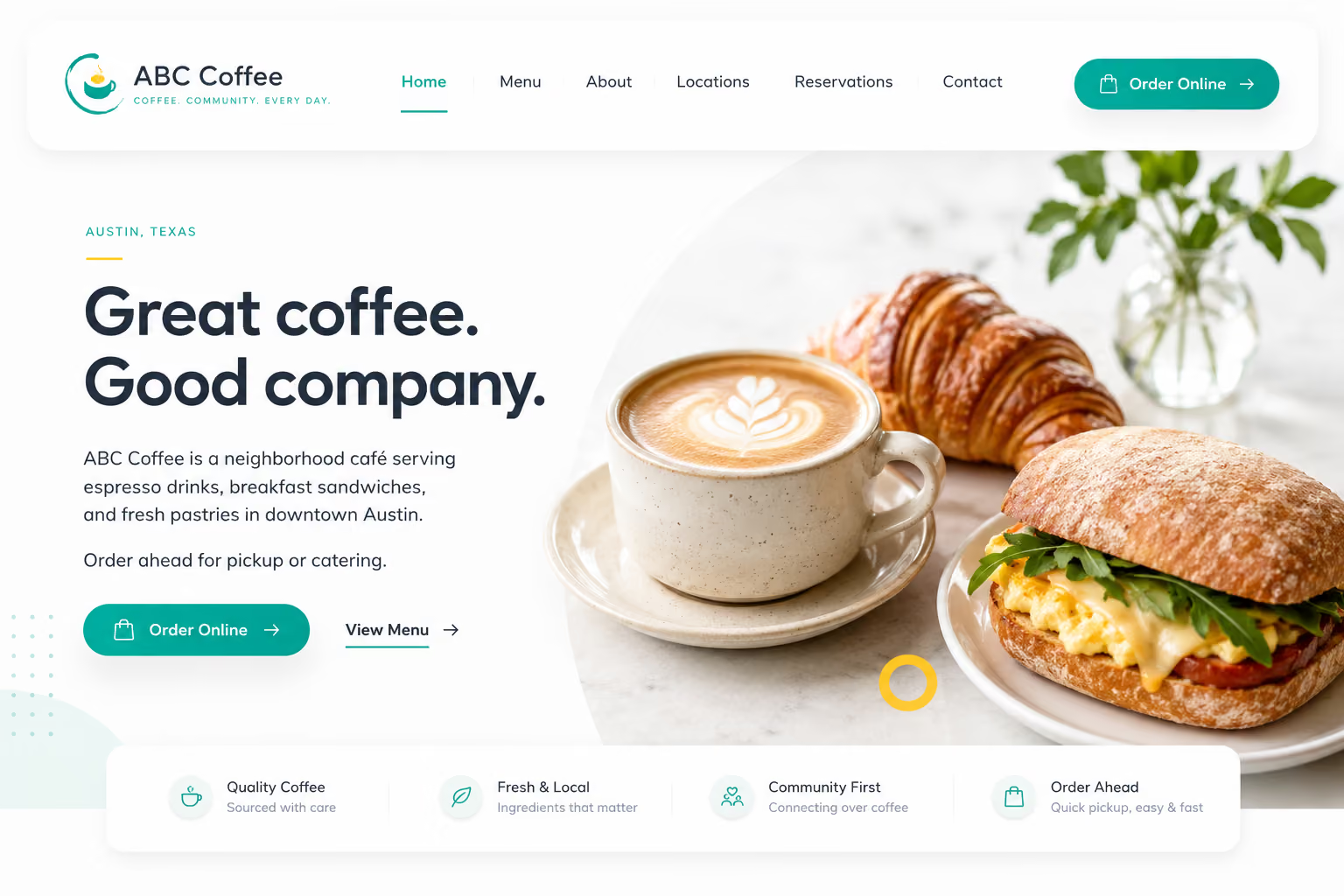
If reservations are also important to your business, you may add a secondary “Reserve a Table” button. But direct ordering shouldn’t be buried among several competing actions.
Keep the website copy brief: popular dishes or menu categories, a short restaurant introduction, location and operating hours, catering or reservation information, and contact and social links. Customer reviews help build trust and can improve conversion rates.
Then add only the supporting pages your restaurant needs, such as Locations, About, Catering, Reservations, and Contact. A website for online ordering should also include an FAQ page for higher chances of ranking on Google and AI search tools.
4. Convert your existing menu into an orderable menu
When working out how to create an online ordering website, start with the menu your restaurant already has — on your website, a third-party marketplace, a PDF, or an image file. Use the most accurate version for this so you don’t have to recreate the menu from memory.
Add your categories, item names, prices, descriptions, and photos to your ordering menu.
Keep in mind that a display menu and an orderable menu are different things:
- A display menu tells customers what you sell.
- An orderable menu needs rules: what a customer can choose, what they must choose, what costs extra, what is available by order type, and what should appear only at certain times.
How much that varies depends on the restaurant. For example:
For each item, mark which choices are required and which are optional.
Add the correct charge for toppings, substitutions, upgrades, or extras, and set limits where necessary. For example, you may require one crust choice, allow up to five toppings, or require customers to select one side and one drink with a combo.
Next, choose which items customers can order for pickup, delivery, catering, curbside pickup, or dine-in. You might offer your full menu for pickup, remove fragile dishes from delivery, and make party trays available only for catering.
5. Match your online ordering system to your kitchen operations
Understanding how to create an online ordering website also means matching the ordering flow to the way your restaurant accepts orders.
If you offer delivery, pickup, curbside, dine-in QR ordering, and catering, we can configure them as separate order types, each with their own rules.
Restolabs’ internal data shows that 60.1% of orders are fulfilled through pickup, compared with 39.9% through delivery. That makes pickup rules just as important as delivery rules, from available hours and preparation times to location-specific customer instructions.
Ordering rules tend to differ by type:
- Pickup may be available all day.
- Delivery may start later or stop earlier than pickup.
- Curbside may need the customer’s vehicle details at checkout.
- Dine-in QR ordering may need the table number attached automatically.
This helps customers see only the ordering options that actually apply to them, while your team receives each order with the right details from the beginning.
Therefore, define when orders should be accepted, including your regular store hours, pickup hours, delivery hours, holiday closures, cutoff times, prep times, and catering lead times.
If your kitchen needs 25 minutes for pickup orders but 45 minutes for delivery orders, that timing can be reflected in the ordering flow. If catering orders need 48 hours’ notice, customers can be asked to schedule ahead instead of placing a same-day order your team can’t fulfill.
The same logic applies to item availability.
If breakfast items are available only until 11 AM, certain specials should appear only on weekends, or catering trays should not show up for regular delivery orders, those rules can be folded into the menu setup through item availability, day-based timing, and order-type visibility.
🍽️ Explore: Restaurant Order Management
6. Set food delivery rules around your service area
When considering how to create an online ordering website, define your delivery management settings before it starts accepting orders. Get them wrong, and customers may place orders from areas your restaurant doesn’t serve, or you may lose margin on long-distance deliveries.
Configure delivery around how you already fulfill orders. That can include a simple delivery radius, map-based zones, minimum order values, zone-specific fees, free-delivery thresholds, excluded areas, and delivery hours.
A common setup looks like this:
- Free delivery within 2 miles
- Charge $5 within 5 miles
- Switch off delivery beyond that area
If you’re in multiple locations, define delivery rules per location, so a customer is routed to the right store based on where they’re ordering from. That avoids the familiar mess of one branch receiving an order that belonged to another.
Your fulfillment can follow your real operations too, whether you use your own drivers, third-party fleets, or both. For instance, if your team handles nearby drops and hands longer runs to a delivery partner, the setup can reflect that split on Restolabs.
Based on this, you can also switch on delivery tracking and status updates so customers know what is happening after checkout.
Set up this way, delivery protects your margin and your service quality at the same time. It keeps you from taking orders that lose money on the drive, routes each order to the right kitchen, and gives the customer a delivery time they can rely on.
7. Connect online payments, payment options, and order routing
Once items are in the cart, checkout has to reflect how your restaurant collects payment and handles incoming orders. Protecting customer data is crucial for website security.
Depending on your setup and payment processor, enable the payment methods you want to offer, including online card payments, digital wallets such as Google Pay and Apple Pay, cash on delivery, or card on delivery.
From there, you can ask us to configure the checkout for you with the right taxes, tip options, service fees, delivery charges, and order instructions.
This is critical as it helps customers see the final cost clearly, including how they’re paying, what charges apply, whether a tip or service fee has been added, and what instructions they need to provide before they complete the order.
Payment is only half of the checkout process.
Online ordering systems automate order management processes. After the customer places the order, it needs to reach the right place inside your restaurant.
That may be the Restolabs dashboard, order notifier app, POS, delivery workflow, team email/SMS notifications, or Kitchen Display System (KDS). Decide how you actually work, and route orders accordingly.
Keep the POS and payment setup that works for you.
Connecting online ordering shouldn’t require you to replace the systems your restaurant already uses. Restolabs integrates with a range of POS and order-management platforms, allowing orders to flow into the setup your team already knows.
You can also choose from supported payment processors based on rates, payout terms, payment methods, and regional availability. This gives you more flexibility than platforms that bundle POS, ordering, and payments into one closed ecosystem.
Restolabs currently offers integrations across the following categories:
When checkout and routing are designed around your real workflow, two things happen: customers pay without friction, and your team receives every order where they expect it, with less manual re-entry when your POS or order-management system is connected.
💻 Check Out: Choose the Best Restaurant Website Builder in 2026
Take Your First Direct Order: How to Create an Online Ordering Website With Restolabs
After you’ve worked through the main parts of your online ordering website, test the full ordering flow. That covers the item choices, order types, delivery rules, payment methods, checkout charges, and the way each order reaches your team.
If this is something you want Restolabs to handle, no problem. The best part is how fast it comes together with us.
Depending on how complex your menu is, how many locations you run, which integrations are involved, and how much review your team needs, most restaurants can be ready to launch in three days, with a one-time setup fee typically ranging from $100 to $200.
Before launch, we’ll give you and your team a full walkthrough of your website: the backend, order dashboard, incoming order flow, menu controls, and any connected systems your team will use, so everyone knows where to view, manage, and act on orders.
Once you’re happy with what you see, we launch. And our support doesn’t stop there. We’re available 24/7, so you’re never stuck figuring out things on your own once your site is taking orders.
Restolabs gives you built-in retention tools that use direct-order customer data to bring more customers back through your own channel instead of relying on third-party apps.
You can run loyalty programs that reward customers for repeat orders, create coupon codes for first-time buyers, slow weekdays, catering orders, or high-value carts, and display promo banners on your ordering page so customers see active offers before checkout.
You can also send push notifications for new items, limited-time specials, holiday deadlines, and loyalty rewards through your branded mobile app.
So what are you waiting for? Book a free Restolabs demo and we’ll show you what your first order flow could look like.

Sakthi Vignesh is a product and technology leader specializing in scalable solutions for the hospitality industry. As the force behind Restolabs, he focuses on building robust, user-centric platforms that help restaurants streamline operations and grow efficiently. With deep expertise in technology, product strategy, and system architecture, he drives innovation at the intersection of business and tech.
Frequently Asked Questions
Some of RestoLabs's essential features include custom branding, mobile optimization, real-time menu updates, multilingual support, POS integration, customizable online ordering and analytics.
Yes, you can create a restaurant website without technical skills using RestoLabs. RestoLabs offers an affordable white-glove setup that helps you build and customize your website according to your needs.
You can promote it through social media, optimizing for SEO, running targeted ads, encouraging customer reviews, and through loyalty programs to incentivize repeat customers and increase engagement.
You can ensure this by using responsive design, testing your website across devices, simplifying navigation, and optimizing the load speed. This will ensure that the key features, such as menus and reservations, are easily accessible on mobile phones.
Yes. You don’t have to remove your marketplace listings to start using Restolabs. Many restaurants continue using platforms like DoorDash or Uber Eats for discovery while using Restolabs as their direct ordering channel. The difference is that once customers already know your restaurant, you can guide them to order directly from your website, Google profile, Instagram bio, QR codes, email receipts, or packaging inserts. That helps you avoid paying high third-party commissions.
Yes. Your menu isn’t locked after launch. You can update item names, prices, descriptions, images, availability, add-ons, modifier groups, and timing rules as your restaurant changes. For example, you may need to mark an item as sold out, add a seasonal special, change lunch pricing, remove a limited-time dessert, or update catering availability.
Restolabs can help you control how online orders come in during busy periods. Depending on your setup, you can adjust prep times, pause ordering, limit order availability, change item availability, or control when certain order types are accepted.
Once your ordering page is live, the next step is to place the link everywhere customers already interact with your restaurant.
You can add it to your restaurant website, Google Business Profile, Instagram bio, Facebook page, TikTok bio, email signature, SMS campaigns, QR codes, printed menus, table tents, receipts, packaging stickers, and order confirmation emails.
You can also train your team to mention it to regulars: “Next time, order directly through our website for pickup and delivery.” Your goal should be to make the direct ordering option visible every time someone is ready to order again.
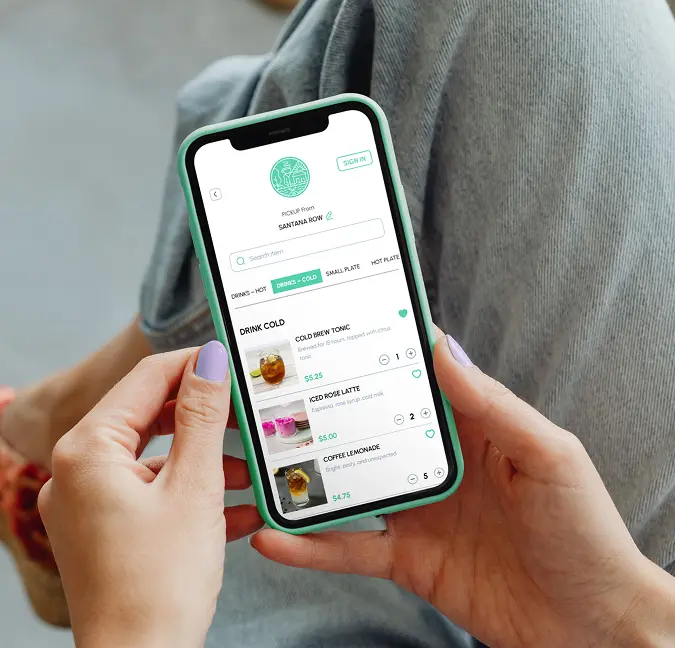



.jpg)
.jpg)
.jpg)




.webp)

.svg)
.webp)